
Search Console, July 2026
Google Search Console Platform Properties: The UK Guide
Google Search Console platform properties let you track how your Instagram, TikTok, X and YouTube posts perform in Google Search, with no website required. Here is what the feature does, how to set it up, and what 24 hours of real data from our own Instagram account actually showed.
Google Search Console platform properties are a new type of Search Console property that reports on a social or video account instead of a website. You connect an Instagram, TikTok, X or YouTube account, authorise the link, and Search Console then shows you the clicks, impressions, click-through rate, average position and actual search queries that Google Search, Discover and Google News send to those posts.
Google introduced them on 7 July 2026 and made them globally available to everyone on 29 July 2026. The important part is not the reports. It is the verification model. For the first time since Search Console launched, you can add a property without owning a domain.
Key takeaways
- Four platforms are supported: Instagram, TikTok, X and YouTube. Facebook, LinkedIn, Pinterest and Threads are not included.
- No website needed. Verification happens by authorising the social account, not by uploading an HTML file or editing a DNS record.
- It measures Google, not the platform. Search Console will not show you your TikTok in-app views. It shows only what Google Search, Discover and Google News did with your content.
- Every account is a separate property. There is no bulk setup and no combined dashboard, so an agency with ten clients on three platforms each is looking at thirty individual verifications.
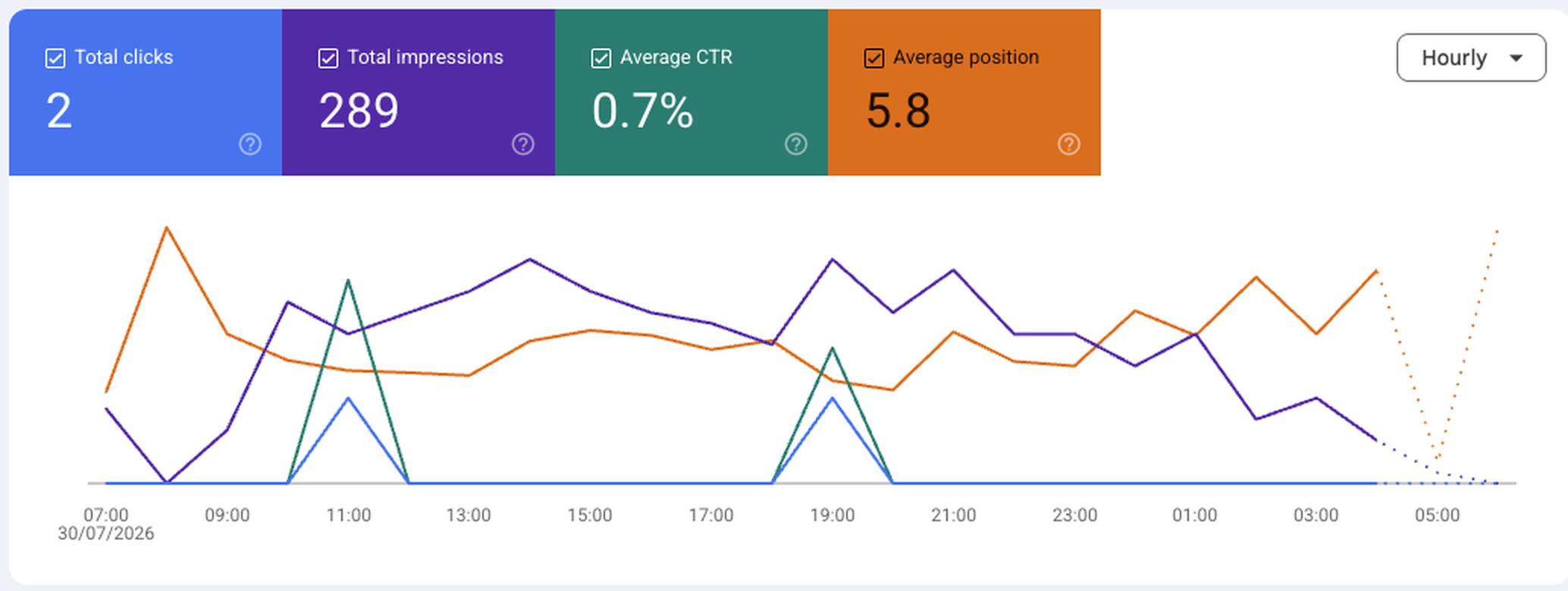
- Our own 24-hour read: 289 impressions, 2 clicks, 0.7 percent click-through rate, average position 5.8. Roughly one in five impressions came from brand queries. The rest came from content topics we had never tracked.
- The strategic value is query data, not click data. Clicks from social results are low by design. The queries tell you what your audience is actually searching for.
Section 1
What platform properties actually are
A property type that reports on content you publish but do not host.
Search Console has always worked on one principle: prove you control the address, and Google will hand you the performance data for it. That proof came in two shapes. A Domain property covered everything on a domain and was verified through DNS. A URL prefix property covered a section of a site and was verified through an HTML file, a meta tag, an analytics snippet or a tag manager container. Either way, the transaction was the same. Ownership of a web address bought you visibility into that address.
Platform properties break that. Google's help documentation now describes a property as something you create for an account or channel, and lists Instagram, TikTok, X and YouTube as supported. You do not own instagram.com. You cannot add a DNS record to it. What you can do is prove that you control a specific account on it, and Google has decided that is enough.
This matters more than the reports do. A creator with 4,000 followers and no website now sits inside the same measurement tool that enterprise SEO teams have used for a decade. A restaurant with an Instagram account and a booking widget can see, for the first time, which Google searches are surfacing its Reels. A social media manager can walk into a review meeting with query-level evidence rather than platform-native reach figures that no client outside marketing has ever fully trusted.
The scope is narrow and Google is explicit about it. Platform properties only show how your content performs on Google Search, Discover and Google News. Google's documentation states plainly that they do not track when people see your content on the platform itself, so a TikTok video's in-app view count is still a TikTok problem. This is a measurement layer for the slice of your social reach that arrives through Google, and nothing else.
Search Console used to answer "how does my website perform in Google Search". It now also answers "how does my Instagram account perform in Google Search". Those are different questions, and until this month only one of them had a free, first-party, query-level answer.
Where your social content actually shows up
Google's guide illustrates three placements where platform content appears: a short video carousel, a latest posts carousel, and a "what people are saying" carousel. If you have ever searched a restaurant name and seen a row of vertical videos, or searched a breaking topic and seen a strip of recent posts, you have seen the surfaces this feature measures. Those carousels have been quietly accumulating impressions for brands for years. Nobody had a counter on them.
There is a second surface that matters at least as much. Google Discover now carries social and short-form video alongside web articles. Discover is a personalised recommendation surface, not a search results page, and for many consumer brands it delivers meaningful volume. Platform properties report Discover alongside Search, though Google notes the Discover and Google News reports only appear once your content has actually received traffic from those surfaces. An empty Discover tab is not a bug, it is an absence of data.
Section 2
The timeline, and why it happened now
Two announcements, three weeks apart, and one long build-up.
| Date | What happened | Why it matters |
|---|---|---|
| Dec 2025 | Google introduced social channels in Search Console Insights, an experiment that surfaced limited social data for a small set of verified websites. | The precursor. It required you to already own and verify a website, so social-only creators were excluded. |
| 7 Jul 2026 | Platform properties announced on the Search Central Blog by Moshe Samet, Product Manager Lead for Search Console. Google states the feature will become available gradually over the coming weeks. | The property type becomes standalone and self-service. No website required. Rollout was uneven, so many accounts saw nothing for weeks. |
| 29 Jul 2026 | Daniel Waisberg and Lizzi Sassman confirm platform properties are globally available to everyone, and publish a companion guide on analysing social and video content performance. | The staggered period ends, 22 days after launch. Worth knowing: Google's own help documentation still carries the older line about a gradual rollout, so the two Google sources disagree at the time of writing. |
The framing in Google's own announcement is worth reading carefully, because it is unusually candid. The argument is that a homepage is no longer the whole story of an online presence, and that audiences increasingly find creators through short video and social feeds rather than traditional web pages. That is Google describing a shift away from the open web it spent twenty-five years indexing, and then shipping a tool to measure the destination.
It also arrives during a period when Google has been building non-website distribution aggressively. Discover began carrying social and short-form video. AI Overviews and AI Mode changed how many results a searcher ever needs to click. Publishers across the industry have reported traditional search referrals shrinking as a share of total traffic. Platform properties do not reverse any of that. What they do is give you an instrument pointed at where the attention went.
For UK brands the practical read is simple. If you have been running social and web as two separate measurement worlds, Google has just given you a free bridge between them. Whether you use it is now a resourcing decision rather than a tooling one. That is the same argument we make in our guide to social media marketing versus social media management, where the difference between the two functions is almost always a difference in what gets measured.
Section 3
What they are not: Search profiles and the 2025 experiment
Three Google features launched within months of each other. They are routinely confused. They should not be.
The confusion is understandable. Google shipped Search profiles, then social channels in Insights, then platform properties, all inside about eight months, all involving social accounts, all announced with similar language. They do completely different jobs.
Search profiles are public. Platform properties are private.
A Search profile is a public-facing page that pulls a creator's content from multiple platforms into one place, so followers can browse it from Google Search or Discover. It is a shop window. A platform property is an analytics dashboard that only you can see. One is distribution, the other is measurement.
The eligibility gap is the part most people miss. Search profiles are currently only available in the United States, and require a minimum following on at least one platform: 100,000 on YouTube, Instagram or X, or 300,000 on TikTok. You must also be over 18 and meet Google's content policies. That rules out the overwhelming majority of UK businesses and creators.
Platform properties have no follower threshold at all. That asymmetry is the single most useful fact in this article for a small or mid-sized brand. The feature that would boost your visibility is gated behind a six-figure audience. The feature that gives you the data is open to everyone, everywhere, today.
Google's guide notes that if you have already claimed a Search profile, all of your verified accounts are automatically added as properties in Search Console. So the small number of creators who qualify for both do not have to do the setup twice.
It is not an indexing tool
Adding a platform property does not submit your posts to Google, does not request indexing, and does not influence ranking. Google's help documentation says that creating a Search profile does not directly affect ranking, and platform properties are a reporting layer with even less influence than that. If your Instagram Reels are not appearing in Google Search today, verifying the account will tell you that clearly and will not change it.
That last point is worth repeating to anyone selling this as an SEO tactic. It is a measurement feature. The tactic comes afterwards, when you decide what to do about what you learn.
Section 4
How to set one up, step by step
Under two minutes per account, no technical knowledge, no developer.
-
Sign in to Search Console with the right Google account
Use the account you want the data to live in permanently. For agencies, this should be a client-owned account with your team added as users, not a personal login that walks out of the door with whoever set it up.
-
Open the property selector and click Add property
The property selector sits at the top of the left sidebar. You can also go straight to the Search Console welcome screen. Existing website properties are unaffected.
-
Choose the platform
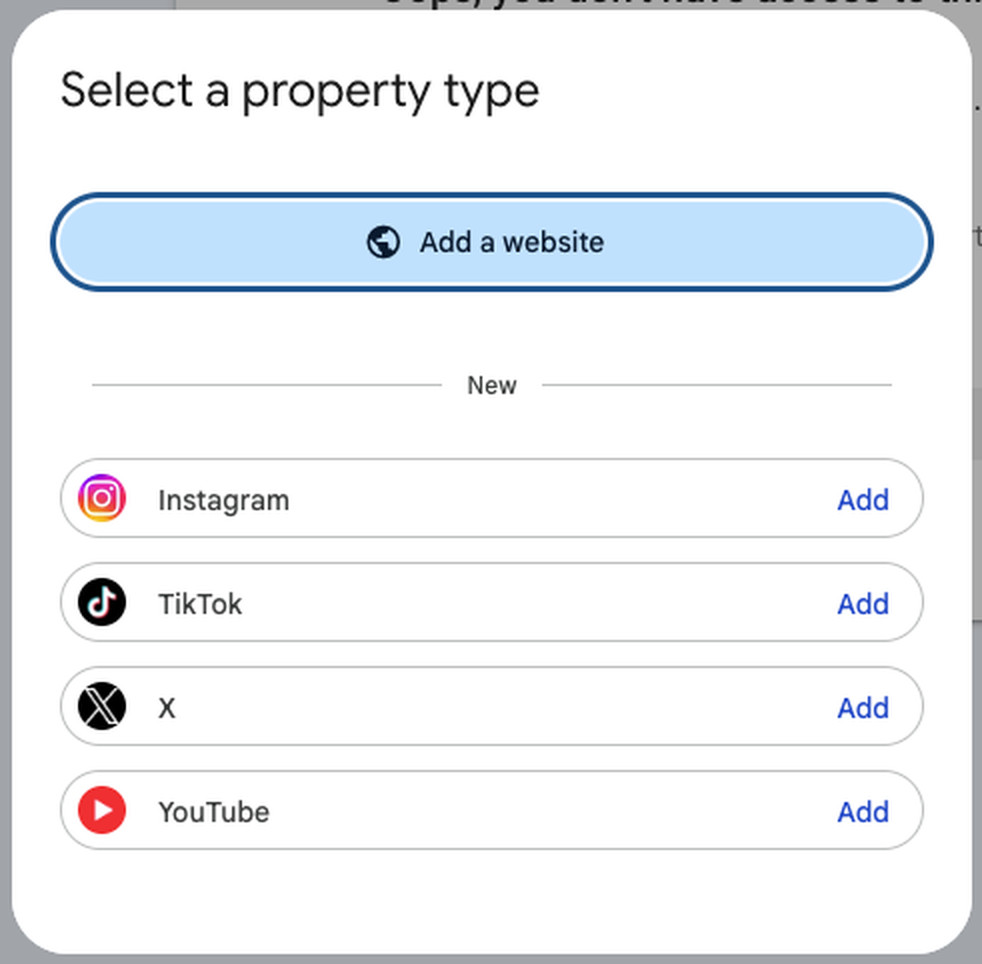
The dialogue now shows "Add a website" at the top, then a section headed New listing Instagram, TikTok, X and YouTube, each with an Add link beside it. Click Add next to the one you want.

The dialogue as it appears in a live Search Console account, 30 July 2026. The four platforms sit under a heading marked New, below the existing Add a website option.
-
Authorise the connection
You sign in to the social account and approve the link. There is no HTML file, no DNS record and no tag manager. If you manage several brand or client profiles on one platform, check very carefully which profile you are authorising.
-
Click Go to property, then wait
Google states it takes a few days for data to appear in the reports. Empty charts on day one are expected. Charts covering only part of the window are expected for the first few weeks, because collection starts when the property is created.
-
Repeat for every account
Each account on each platform is its own property. An Instagram account, a TikTok account and a YouTube channel for the same brand are three separate properties with three separate reports. The number of properties you can hold is not the constraint here. Time is.
Google periodically re-checks ownership. If the external login expires, access to the platform property pauses until you re-verify. The good news is that re-verifying restores the same report immediately and you do not have to wait for data to accumulate again. Put a recurring calendar check against it, because a paused property fails silently.

Verification takes minutes. Deciding what to do with the numbers is the part that takes a strategist.
Section 5
The three reports you get
Performance, Insights and Achievements, reusing the reporting layer Google already built for websites.
Performance report
This is the one that matters. Total clicks, total impressions, average click-through rate and average position, plotted over time, with tabs underneath breaking the data down. On a website property those tabs read Queries, Pages, Countries, Devices, Search Appearance. On a platform property, Pages becomes Posts. It is a small interface change that tells you exactly how Google is modelling this: each post or video is a document, and each document has a position in the results.
You can filter by country, by date, by search type and by specific search terms. You can also filter by post, which is how the format comparisons described later in this article work. The data can be exported, which is currently the only way to see more than one platform at once.
Insights report
A simplified, visual summary aimed at people who want an answer rather than an analysis. It shows a traffic trends overview for the last 28 days, your top-performing posts or videos, the queries people used to find you, and which countries your audience came from. It also carries the query groups card, which clusters similar search terms into themes and labels them as top, trending up or trending down.
Google flags this explicitly in the documentation. The top summary card on Insights counts all clicks to your property across Google, including web, image, video and news search. The detailed lists below it focus specifically on web search results. The totals in those lists can therefore be lower than the headline number, and that is correct behaviour rather than a discrepancy.
Achievements
A growth and milestone tracker for click-based accomplishments, such as passing a new total-clicks target. It is the least analytically useful of the three and the most useful for morale, which is not nothing when you are three months into building a content engine and want something to show for it.
How impressions and clicks are counted
Two definitions from Google's help documentation are worth knowing before you interpret anything.
| Content type | What counts as an impression | What counts as a click |
|---|---|---|
| Instagram stories | The story appearing in Google search results. | A user clicking that story from search results. |
| Video played on Google | The video appearing in search results or Discover. | A user clicking it. Google notes this counts even when the click opens the video inside the Google viewer rather than sending the user to the platform. |
That second row is the important one. A click in this report does not necessarily mean a visit to your profile. It can mean a play inside Google. If you are reporting these numbers to a client, say so, because it changes what the number is worth. It is closer to a view than to a session.
Section 6
Our data: 24 hours on one Instagram account
First-party numbers from the Velena Lifestyle Instagram platform property, 30 July 2026, 24-hour view, search type Web.
Reading about a feature is one thing. Here is what it produced for a real UK account with a modest following, in a single day, on the web search type only.
The first observation is that the number is not zero. An Instagram account with a five-figure following generated 289 Google Search impressions in a day at an average position of 5.8. Extended naively across a year that is roughly 105,000 impressions, from a surface that most UK brands have never had any visibility into and therefore never optimised. Treat the annualised figure as an illustration rather than a forecast, because a single day is a single day and seasonality, virality and algorithm changes will all move it.
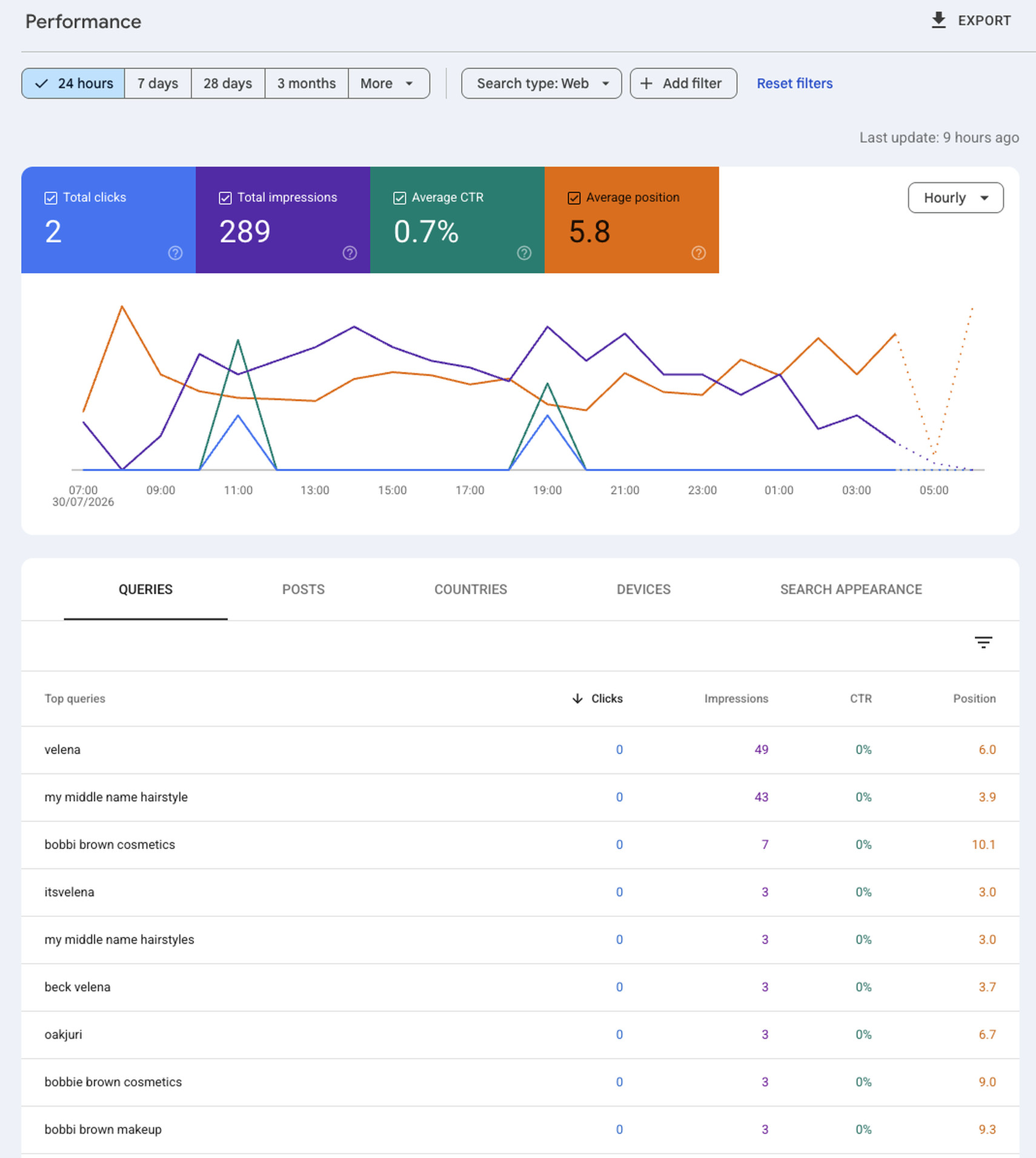
The full report. Note the tab row reads Queries, Posts, Countries, Devices, Search Appearance. On a website property that second tab says Pages. Google is modelling each post as a document with a position in the results.
The queries are where the value is
| Query | Impressions | Clicks | Average position | Query type |
|---|---|---|---|---|
| velena | 49 | 0 | 6.0 | Brand |
| my middle name hairstyle | 43 | 0 | 3.9 | Topic and trend |
| bobbi brown cosmetics | 7 | 0 | 10.1 | Third-party brand |
| itsvelena | 3 | 0 | 3.0 | Brand handle |
| my middle name hairstyles | 3 | 0 | 3.0 | Topic and trend |
| beck velena | 3 | 0 | 3.7 | Brand |
| oakjuri | 3 | 0 | 6.7 | Third-party brand |
| bobbie brown cosmetics | 3 | 0 | 9.0 | Third-party brand, misspelling |
| bobbi brown makeup | 3 | 0 | 9.3 | Third-party brand |
Four findings come straight off that table, and each one has a decision attached to it.
Finding one: brand queries are only about a fifth of the demand
The three clearly branded queries, velena, itsvelena and beck velena, account for 55 impressions of 289. That is roughly 19 percent. The other 81 percent came from people who were not looking for us. On a website property, a branded-versus-non-branded split like that would be considered healthy. On a social account it is genuinely new information, because platform-native analytics have never told anyone how much of their reach came from unbranded intent.
Finding two: a single content trend produced 16 percent of a day's impressions
"my middle name hairstyle" and its plural variant delivered 46 impressions at average positions of 3.9 and 3.0. That is top-four visibility in Google for a trend term, from an Instagram post, on an account with no dedicated SEO effort behind it. A social-first trend has crossed over into search demand, and until this month there was no free way to know that had happened.
The decision that follows is obvious once you can see it. If a format is earning top-four positions in Google, you make more of that format, you make sure the caption uses the phrase people are actually typing, and you consider whether the same idea deserves a long-form treatment on a channel you own. That is exactly the loop we describe in our guide to Instagram management services in the UK.
Finding three: a beauty account is surfacing against third-party brand searches
Three variants of Bobbi Brown queries, including a common misspelling, produced 13 impressions between them at positions of 9.0 to 10.1. Somebody searching for a cosmetics brand was shown our creator content. Positions of nine and ten are the bottom of page one or the top of page two, so the visibility is marginal, but the mechanism is not marginal at all. This is precisely the discovery path that a beauty brand pays a creator agency for, and it is now measurable rather than assumed.
For any brand running user-generated content campaigns, this reframes the value of a creator partnership. The content is not only a paid social asset. It is also an organic search asset ranking against your own brand terms and your competitors'.
Finding four: click-through rate on social results is very low, and that is normal
Every one of the top nine queries recorded zero clicks and a zero percent click-through rate. The two clicks that made up the property total came from somewhere further down the long tail. A 0.7 percent click-through rate at an average position of 5.8 would be alarming for a web result, where a position that high usually earns several percent at minimum.
It is not alarming here, for three structural reasons. Social content appears inside carousels, which generate impressions generously and clicks reluctantly, because a user can consume the thumbnail and the caption without clicking anything. A click may resolve inside the Google viewer rather than sending traffic anywhere. And a searcher who wants Instagram usually goes to Instagram. If you set a click-through-rate target for a platform property using website benchmarks, you will fail it every month and learn nothing.
This is one account, one platform, one day, one search type. It is not a benchmark and should not be quoted as one. What it demonstrates is the shape of the data and the type of decision it enables, not a norm that other accounts should expect to match.
What we changed as a result
Three things, within a week. We added the winning trend phrase to the captions and alt text of related posts rather than relying on hashtags alone. We flagged the third-party brand queries to inform which product categories we pitch for paid creator work. And we set a standing monthly review of the query groups card so that rising themes are caught while they are still rising, rather than three months after the peak.

Every piece of content we shoot is now also a search asset. Platform properties are the first free way to prove it.
Done for you
Social Media Management Plans
We set up platform properties for every client account we manage, then read them monthly and act on what they say. Rolling monthly, 2 months notice, no setup fees.
16 posts a month, static and carousels, across 2 platforms with Meta cross-posting. Community monitoring, we flag. Monthly snapshot plus a quarterly deep dive.
View Seed
16 posts a month, 8 Reels and 8 static, across 3 platforms. Community monitoring, we flag. Monthly reporting and an optional monthly strategy call.
View Grow
16 posts a month, 12 Reels and 4 static, across 3 platforms. Stories 3 times a week. Full community management Monday to Saturday. 1 in-house UGC video a month.
View Scale
Exactly 20 posts a month, one per working day, up to 5 platforms. Stories 3 times a week. Full community management 7 days. 3 UGC videos a month plus paid ads.
View Elite
Content creation, done for you. 12 static posts a month on 1 platform of your choice, Instagram, Facebook or LinkedIn. Community management is not included and we say so openly. Your first month is credited against any management plan if you move up.
View the Small Business PackSection 7
Six ways to actually read the data
Google published a companion guide on 29 July 2026 setting out specific workflows. Here they are, with what we would add to each.
1. Use query groups to find themes, not terms
The Insights report clusters similar queries into groups and labels them top, trending up and trending down. Google's argument is that analysing these themes tells you what your audience cares about, which then feeds your next video topic, caption or hashtag decision.
What we would add: the trending down list is the more valuable of the two. Anyone can spot a rising theme from platform analytics. Very few people notice a theme quietly dying, because a declining format usually still produces acceptable engagement right up until it does not. A theme dropping out of Google demand is an early warning that usually precedes the platform-native decline.
2. Use the 24-hour filter to catch spikes while they are still spikes
Google's example is a get-ready-with-me video posted yesterday where a specific search term suddenly starts driving traffic. The 24-hour filter on the Performance report shows you that in near real time, and Google suggests cross-promoting on another platform while the surge is live.
What we would add: the data latency is real but manageable. Our own report was stamped "last update 9 hours ago", so this is fast but not instant. Build the check into the daily routine rather than treating it as an alerting system, because nothing will notify you.
3. Compare formats using URL comparison mode
This is the most immediately actionable technique in the whole guide, and it works because of how the platforms structure their URLs.
| Platform | Compare this | Against this | Question it answers |
|---|---|---|---|
| YouTube | URLs containing /watch | URLs containing /shorts/ | Is long-form or short-form earning our Google visibility? |
| URLs containing /p/ | URLs containing /reels/ | Are static posts or Reels the search asset? | |
| YouTube | URLs containing playlist | Each other, not individual videos | Which of our playlist pages earn the most traffic? |
One detail worth getting right, because it is easy to misread. The playlist technique is a filter rather than a head-to-head comparison: you filter to URLs containing the word playlist and then compare the playlists against each other. Google also notes it shows the performance of the playlist page itself, not the videos inside it.
What we would add: run this before your next content planning session, not after. If Reels are carrying your Google visibility and static posts are not, that is a production-mix decision worth real money, and it is the kind of evidence that changes a client's mind in a way that a slide about industry trends never does.
4. Compare across platforms by exporting
There is no combined dashboard. Google's stated method is to open each platform property, filter to the content you want, click Export, choose your file format, and repeat for every property. Then you compare in a spreadsheet.
What we would add: this is tedious and it is also where the insight lives. Google's own example is a long-form cooking tutorial performing well on YouTube while the shorter TikTok version gets no search traction, which is a repackaging signal. Build one spreadsheet with a tab per property and a summary tab, and it becomes a fifteen-minute monthly job rather than an hour.
5. Use annotations to prove your edits worked
Search Console annotations let you bookmark a date on the performance chart. Google's guide suggests using them to record when you rewrote a TikTok caption or a YouTube title, then comparing performance either side of the marker.
What we would add: this is the closest thing to a controlled test that social media has ever had. Platform algorithms make on-platform testing almost impossible because distribution is personalised and volatile. Google Search demand is comparatively stable, so a caption change that moves your average position is a real signal. Annotate every meaningful edit, including the ones you expect to fail.
6. Slice by country and device before you draw conclusions
The Performance report answers whether specific posts do better in specific countries, and which content is consumed on mobile as opposed to desktop. Google also poses the question worth pinning above your desk: are there search terms you would expect traffic from that you are not getting, and search terms you never imagined you would get traffic from?
What we would add: for UK brands the country filter matters more than people expect. A UK hospitality or retail account frequently discovers a meaningful share of impressions coming from outside the UK, which is either an untapped market or noise that is inflating your averages. You cannot tell which until you filter.
Google recommends pairing this with Google Trends for monitoring rising topics, keyword research and content calendar planning. Both are free, both are first-party, and between them they cover most of what a small team needs before paying for anything.
Section 8
Website property vs platform property vs Search profile
One table to settle the confusion for good.
| Website property | Platform property | Search profile | |
|---|---|---|---|
| What it is | Analytics for a domain or URL prefix you own | Analytics for a social or video account you control | A public profile page on Google |
| Purpose | Measurement | Measurement | Distribution and discovery |
| Verification | DNS record, HTML file, meta tag, analytics or tag manager | Authorise the platform account login | Claim through profile.google.com with a linked platform account |
| Website required | Yes, by definition | No | No |
| Follower threshold | None | None | 100,000 on YouTube, Instagram or X, or 300,000 on TikTok |
| Availability | Worldwide | Worldwide since 29 July 2026 | United States only at present |
| Who sees it | You and users you add | You and users you add | Anyone searching Google |
| Affects ranking | No | No | No |
The practical consequence for a UK business is that two of these three columns are available to you today at no cost, and the third one probably is not. Set up platform properties for every account you own, keep your website property healthy, and treat Search profiles as something to revisit if and when Google expands eligibility beyond the United States.
Featured work
UGC that becomes a search asset
Every video we produce now has two lives: a paid social asset, and content Google can surface against real search demand. Four of our portfolio categories.

Native-feeling shop videos built for conversion and, increasingly, for search.
View portfolio
Product-led creator video for online retail brands selling direct.
View portfolio
Honest review formats, the content most likely to be matched against brand searches.
View portfolio
On-location travel content for hotels, destinations and experience brands.
View portfolioSection 9
The limits nobody is talking about
Five gaps that matter if you are planning to build a process on this.
There is no bulk verification
Neither the July announcement nor the follow-up describes a bulk-verification path for agencies or organisations managing many accounts. Every property is set up and authorised individually, and each authorisation needs whoever holds the platform credentials to be present. For an agency, that credential holder is the critical path, not the Search Console interface. Sequence the rollout across your client base rather than trying to do it in a week.
There is no combined dashboard
Cross-platform comparison happens in a spreadsheet, because Google's own recommended method is export and compare. If your reporting depends on a single view across Instagram, TikTok and YouTube, you are building that view yourself.
API support has not been announced
Website properties feed the Search Analytics API, which is how most automated reporting pipelines are built. Google's announcements say nothing about whether platform properties will do the same. Until that changes, this is manual work, and any agency pricing a reporting retainer should price it as manual work.
Historical data behaviour is unclear
Google has not stated whether a newly created platform property shows data retroactively or only collects from the point of verification. What the documentation does say is that a recently created property may show empty charts at first, and that its charts will only show data for the days since collection started. That phrasing points one way: the record begins at the property, not before it. The practical implication is the same either way. Set your properties up now, even if you have no immediate plan to use them.
Four platforms is not all your platforms
Facebook, LinkedIn, Pinterest and Threads are not supported. For a B2B business where LinkedIn is the primary channel, this feature currently reports on none of the distribution that matters. That is a meaningful gap and it is worth being upfront about it rather than overselling the tool. Our LinkedIn services are measured a different way for exactly this reason.
Every one of these limitations is an argument for setting the properties up sooner rather than later, not for waiting. The gaps are in the tooling around the data. The data itself is accumulating from the day you create the property, and you cannot get back a month you did not measure.
Watch
Our YouTube channels
YouTube is one of the four supported platforms, which means every channel below is now measurable in Search Console. Ours are.
Client work, UGC Shorts and behind-the-scenes from shoots across the UK and Europe.
Visit the channel
Hotel stays, travel and hospitality content filmed on location by the two of us.
Visit the channelSection 10
A sensible 30-day plan
What to do in week one, week two and week four, without pretending you have data you do not have.
| When | Do this | Do not do this |
|---|---|---|
| Days 1 to 3 | List every Instagram, TikTok, X and YouTube account you or your clients own, note who holds each credential, and verify every one of them. Collection starts at creation, so this is the highest-value action available. | Do not open the reports expecting numbers. They will be empty and that is correct. |
| Days 4 to 14 | Let the data build. Check the 24-hour filter every couple of days purely to confirm collection is working and the properties have not silently paused. | Do not report anything to a client or a board. Two weeks of partial data will mislead everyone including you. |
| Days 15 to 21 | Run the first real analysis. Query groups, brand versus non-brand split, format comparison using URL comparison mode, and the country filter. | Do not set a click-through-rate target using website benchmarks. Establish your own baseline first. |
| Days 22 to 30 | Make one content change and annotate it. Rewrite a caption or a title to match a real query, mark the date, and let it run for a month before judging it. | Do not change five things at once, because you will not know which one worked. |
After the first 30 days this becomes a monthly rhythm of about an hour: export each property, refresh the comparison spreadsheet, read the query groups, and pull out the two or three findings that should change next month's plan. That is roughly the same amount of work as a decent monthly social report, which is the point. It slots into an existing process rather than requiring a new one. If you are weighing up whether to run that process internally, our comparison of in-house versus agency social media management covers the trade-off in detail, and our breakdown of social media management costs in the UK covers what it should cost either way.
Section 11
Five myths worth killing early
Every new Google feature attracts confident nonsense within a fortnight. Here is the current crop.
It will not. This is a reporting layer. It does not submit content, request indexing or influence ranking in any direction. The only thing that changes is that you can now see what was already happening.
It measures a different thing entirely. Platform-native analytics tell you what happened inside the app. Search Console tells you what Google did with the same content. You need both, and they will not agree, because they are counting different events.
Social results live inside carousels that generate impressions cheaply and clicks rarely, and a click can resolve inside Google's own viewer. Judge these properties on impressions, position and query mix first. Clicks are the least informative metric in the report.
You do not, and that is the headline change. A creator or business with no site at all can verify an account and get the full reporting set. Websites and platform properties sit side by side in the same Search Console account without interacting.
Google confirmed global availability on 29 July 2026. Its help documentation has not caught up and still describes a gradual rollout, so if you cannot see the option, check the property selector directly rather than assuming either source is current. Either way, waiting costs you data you cannot get back.
One is a public page requiring six figures of following and, at present, a United States location. The other is a private dashboard open to anyone with an account. They share a supported-platform list and almost nothing else.
Section 12
Frequently asked questions
What are Google Search Console platform properties?
Platform properties are a Search Console property type that reports on a social or video account rather than a website. Supported platforms are Instagram, TikTok, X and YouTube. Once you verify an account, Search Console shows clicks, impressions, click-through rate, average position and the search queries that Google Search, Discover and Google News send to your posts. Google introduced them on 7 July 2026 and made them globally available on 29 July 2026.
Do I need a website to use platform properties?
No. This is the central change. Verification happens by authorising the social account rather than by proving control of a domain, so creators and businesses with no website at all can access the reports. If you do have a website property, it is unaffected and sits alongside your platform properties in the same account.
Which platforms are supported?
Instagram, TikTok, X and YouTube. Facebook, LinkedIn, Pinterest and Threads are not supported. Google has not announced whether the list will expand.
How long does it take for data to appear?
Google states it takes a few days for data to appear after setup. New properties may show empty charts initially and partial charts for a while afterwards, because collection begins when the property is created. The default date range on both the Insights page and the Performance report is 28 days.
Does a platform property show my TikTok or Instagram in-app views?
No. Google is explicit that platform properties only show how your content performs on Google Search. They do not track when people see your content on the platform itself. For in-app performance you still need the platform's own analytics.
Will adding a platform property improve my rankings?
No. It is a measurement feature with no effect on how Google ranks or surfaces your content. Google states the same about Search profiles, which do not directly affect ranking either. Any improvement comes from acting on what the data tells you, not from the act of verifying.
Why is my click-through rate so low?
Low click-through rates are normal for social results and should not be read as failure. Social content usually appears inside carousels where users can consume the thumbnail and caption without clicking, and Google counts a click even when it opens the video inside the Google viewer rather than sending a user to the platform. Our own Instagram property recorded 289 impressions, 2 clicks and a 0.7 percent click-through rate at an average position of 5.8 across a 24-hour window. Set your baseline from your own data rather than from website benchmarks.
What is the difference between a platform property and a Search profile?
A platform property is a private analytics dashboard, open to anyone with a supported account, available worldwide. A Search profile is a public page on Google that consolidates a creator's content for followers, is currently only available in the United States, and requires a minimum following of 100,000 on YouTube, Instagram or X, or 300,000 on TikTok. If you have already claimed a Search profile, your verified accounts are automatically added as properties in Search Console.
Can an agency manage platform properties for multiple clients?
Yes, but every account must be verified individually and Google has not announced a bulk-verification path or a combined cross-platform dashboard. Each verification requires whoever holds the platform credentials to be present, so credential access is the practical bottleneck. Cross-platform comparison is currently done by exporting each property and combining the files in a spreadsheet.
What happens if my connection to the platform expires?
Google periodically re-checks ownership. If the connection is lost, for example because an external login expired, access to the platform property pauses until you re-verify. Once you re-verify you get access to the same report and do not need to wait for data to accumulate again.
Is there an API for platform property data?
Google has not announced Search Analytics API support for platform properties. Website properties already feed that API, but neither the July 2026 launch post nor the global rollout post addresses whether platform properties will. Until that changes, reporting is manual through the interface and the export function.
Should a UK business set this up now or wait?
Set it up now. Data collection starts when the property is created, and Google has not confirmed whether historical data is shown retroactively, so every week you delay is potentially a week of data you cannot recover. Verification takes a couple of minutes per account and costs nothing.
Sources
References
- Google Search Central Blog, "See how content from social and video platforms performs on Google Search", 7 July 2026. developers.google.com
- Google Search Central Blog, "Platform properties roll out globally, plus a new social and video performance guide", 29 July 2026. developers.google.com
- Google Search Central, "Analyze your social and video platform content performance in Search Console", last updated 29 July 2026. developers.google.com
- Search Console Help, "About platform properties in Search Console". support.google.com
- Search Console Help, "Add a website or platform property to Search Console". support.google.com
- Google Search Help, "Create a new Search profile". support.google.com
- Google Search Central Blog, "Introducing social channels in Search Console", December 2025. developers.google.com
- Velena Lifestyle first-party data, Google Search Console Instagram platform property, 24-hour view to 30 July 2026, search type Web. Accessed 31 July 2026.
Client reviews
Verbatim, from Google
★★★★★ Rated 5.0 on Google. Read all reviews.
"Fantastic service. Been a client for 3 years now and have seen fantastic results, increased viewers, followers and viral videos. Copywriting was on point and has been used in magazines like Conde Nast, Timeout and more."
"Velena is truly one of our standout creators at Picsart. She consistently brings fresh, innovative ideas to the table and is always tapped into the latest trends. What we especially love is how seamlessly she incorporates AI into her content in a way that feels natural and engaging."
Who wrote this
Velena and Dragos
Two founders, one agency, every deliverable. Based in High Wycombe, Buckinghamshire.

Lifestyle creator with a 13K Instagram following, featured in Women's Health. UGC creator and social media strategist across beauty, fashion, food and lifestyle, and the account whose Search Console data appears in this article.

LinkedIn Top Entrepreneurship Voice 2024 with 25K followers. Handles strategy, measurement and search across the agency's client portfolio and its own properties. Writes about what social media managers actually do and how to hire one.
Keep reading
Related guides
If this was useful, these go deeper on the surrounding decisions: our social media management services, TikTok management services in the UK, the signs you need a social media manager, how to choose a social media agency in the UK, and our free best time to post tool and Instagram engagement rate calculator.
Work with us
We will set this up and read it for you
Every account, every platform, verified and reported monthly, with the findings turned into next month's content plan. That is what social media management is supposed to mean.